Atomsk
The Swiss-army knife of atomic simulations

The Swiss-army knife of atomic simulations




This tutorial explains how to generate a distribution of velocities with Atomsk.
▶ For more information, refer to the corresponding documentation page.
If you wish to perform a molecular dynamics (MD) simulation, you may want to initialize the velocities of atoms. Some modelling softwares have built-in commands to initialize velocities, and so does Atomsk. The option "-velocity" generates a random distribution of velocities according to a Maxwell-Boltzmann distribution.
For instance, to generate atom velocities that correspond to a temperature of 300 K, you may use the following:
atomsk --create fcc 4.046 Al -duplicate 20 20 20 -velocity 300 Al_300K.cfg
ⓘ The option "-velocity" generates new random velocity vectors every time it is invoked. Velocities are corrected so that there is no global drift of the system (sum of velocity vectors is naught). The default unit for velocities is Å/ps, but it can be rescaled with option "-unit".
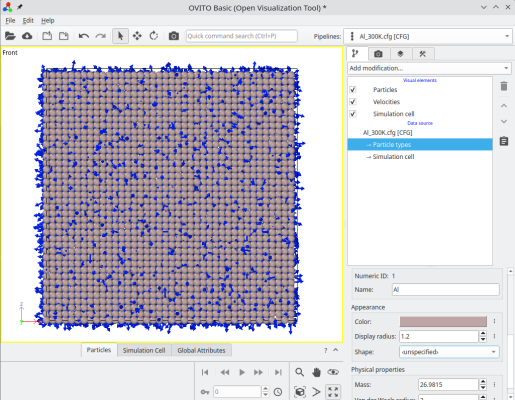
The output file "Al_300K.cfg" will contain the velocity vector (vx,vy,vz) for each atom, which can be visualized e.g. with OVITO (just check the box "Velocities"):
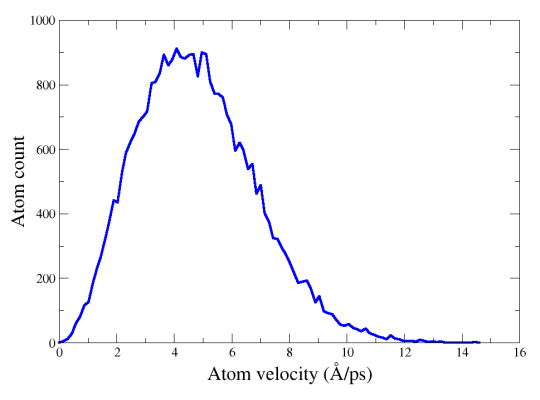
Atomsk also writes the velocity distribution in an additional file named "velocity_dist.dat", which you can visualize with a graphical tool such as Gnuplot, xmgrace or similar softwares: